An Automatic Number Plate Recognition (ANPR) system depends not only on a high-quality ANPR camera, but also on reliable computer hardware capable of processing vehicle images, OCR recognition, database storage, reporting and continuous 24×7 operation. Choosing the right hardware ensures smooth performance, faster recognition, and long-term reliability.
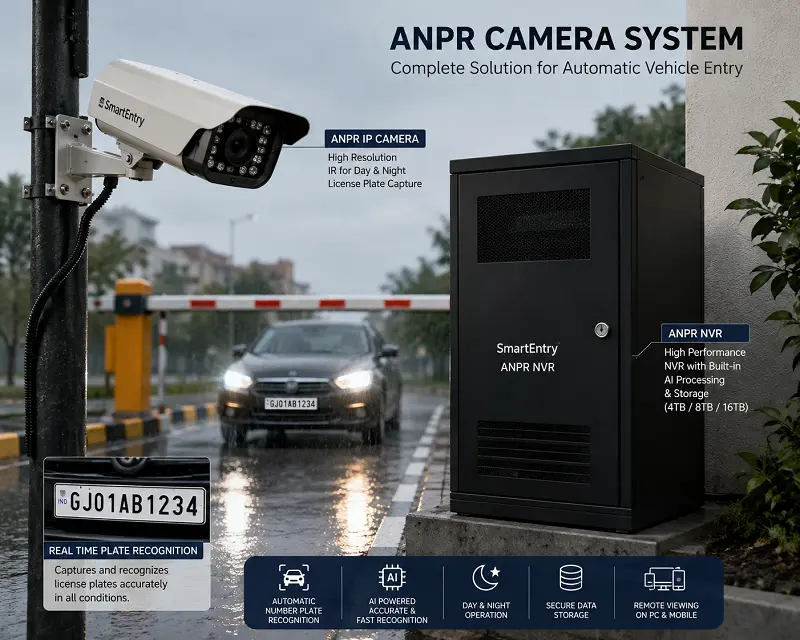
SmartEntry ANPR offers two deployment options
- SmartEntry Pre-configured NVR Hardware
- BYO Hardware (Bring Your Own PC)
The BYO Hardware option allows customers to save installation costs by using an existing Windows desktop, laptop or a newly assembled PC. The SmartEntry ANPR software provides the same features regardless of which hardware option you choose.
Reuse your existing computer, reduce project cost and retain complete control over future upgrades and hardware warranty.
What is BYO Hardware?
BYO (Bring Your Own Hardware) means you provide the Windows computer while SmartEntry provides the complete ANPR software, licensing, installation support, camera integration and remote configuration.
This option is ideal for:
- Residential Societies
- Commercial Buildings
- Factories
- Hotels
- Schools & Colleges
- Hospitals
- Office Campuses
- Existing CCTV Control Rooms
Benefits of BYO Hardware
- Lower initial investment
- Reuse an existing desktop or laptop
- Freedom to choose any compatible hardware brand
- Easy future RAM or SSD upgrades
- Hardware warranty managed directly through your local computer dealer
- No proprietary hardware restrictions
Supported Operating System
SmartEntry ANPR software supports:
- Windows 10 (64-bit)
- Windows 11 (64-bit)
The software can be installed on desktop computers, mini PCs, industrial PCs or laptops. For continuous 24×7 operation, a desktop PC with SSD storage is recommended.
Minimum Hardware Requirement - Single Camera ANPR
Suitable for one Entry or Exit lane with continuous number plate recognition.
| Motherboard | H81 LGA1150 |
|---|
| Processor | Intel Core i3-4170 or Higher |
|---|
| RAM | 8 GB |
|---|
| Storage | 128 GB SSD |
|---|
| CPU Cooling | Intel Original CPU Fan |
|---|
Minimum Hardware Requirement - Dual Camera ANPR
Recommended for projects with dedicated Entry and Exit cameras.
| Motherboard | H81 LGA1150 |
|---|
| Processor | Intel Core i5-4590 / Intel Xeon (4 Core) or Higher |
|---|
| RAM | 16 GB |
|---|
| Storage | 240 GB SSD |
|---|
| CPU Cooling | Intel Original CPU Fan |
|---|
Minimum Hardware Requirement - Lite Version
Suitable for economical installations where basic vehicle logging is required.
| Motherboard | H81 LGA1150 |
|---|
| Processor | Intel Core i3-4150 or Higher |
|---|
| RAM | 4 GB |
|---|
| Storage | 128 GB SSD |
|---|
| CPU Cooling | Intel Original CPU Fan |
|---|
Can I Use My Existing Laptop?
Yes. If your Windows 10 or Windows 11 laptop meets the minimum processor, RAM and SSD requirements, it can run SmartEntry ANPR software without any issue. This is particularly useful for pilot projects, temporary installations and testing environments.
Can I Assemble a New PC?
Absolutely. Many customers prefer assembling a custom-built PC with additional RAM, a larger SSD and a faster processor. This provides better future scalability while keeping the hardware fully under their ownership.
Future Expansion
If you expect to add more cameras in the future, consider selecting a higher-end processor along with 16 GB RAM or more and a larger SSD. This allows your SmartEntry ANPR system to scale easily as your requirements grow.
Who Should Choose BYO Hardware?
- Customers who already own a Windows desktop or laptop
- Sites with an existing CCTV monitoring computer
- Businesses looking to reduce project cost
- Customers who prefer managing hardware warranty independently
- Users planning future hardware upgrades
Conclusion
SmartEntry ANPR has been designed to offer maximum flexibility. Whether you choose our pre-configured NVR hardware or your own Windows computer, you receive the same SmartEntry ANPR software, AI-powered vehicle recognition, reporting and support. The BYO Hardware option is an excellent way to reduce project cost while making use of existing computing resources and maintaining complete control over hardware upgrades and warranty.